
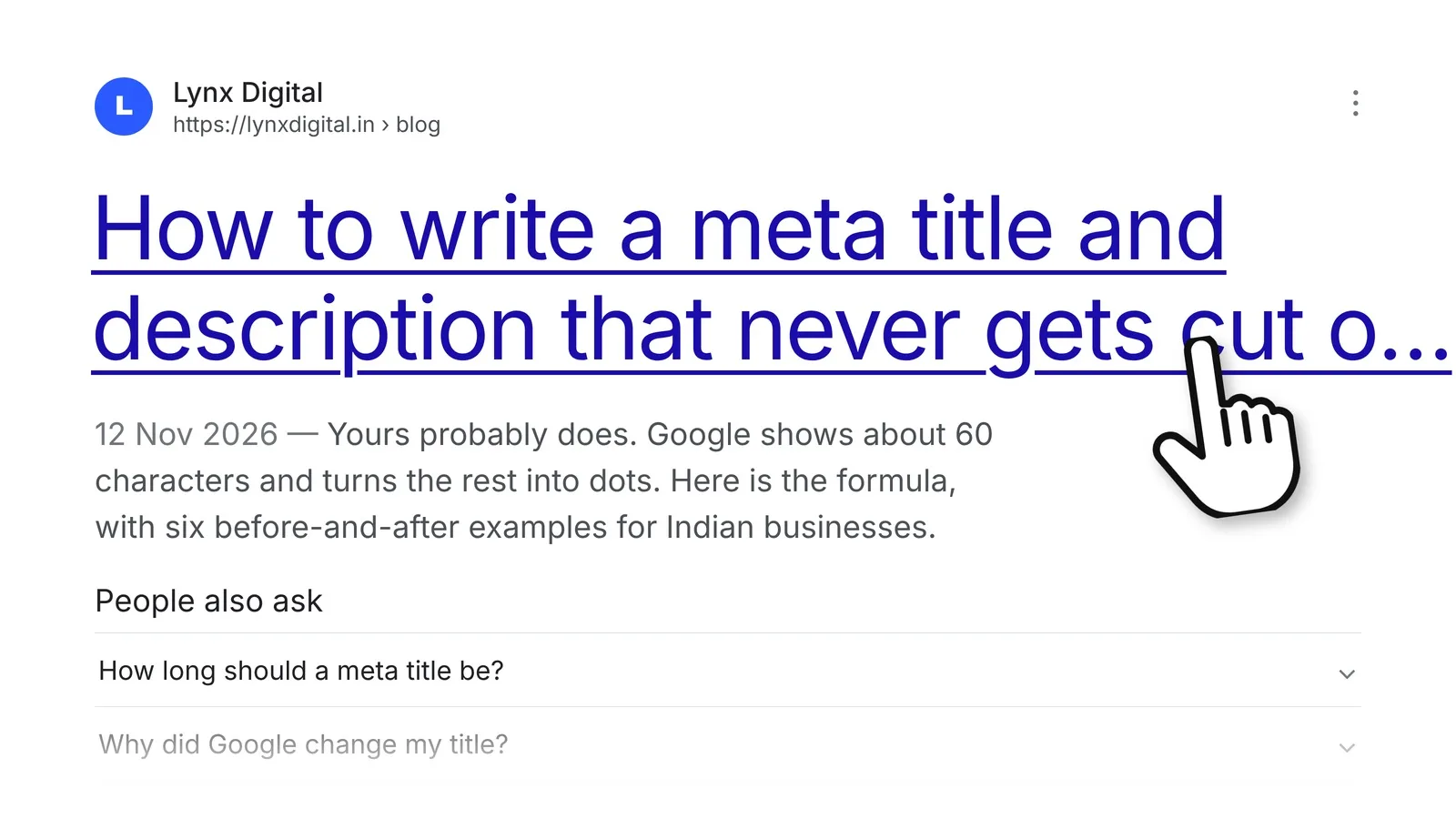
When someone searches on Google, they see two things before they ever see your website: a blue title and a two-line description. Those few words decide whether they click on you or on the business above you. The good news: you control both, and fixing them takes minutes per page.
This guide shows how long each should be, a simple formula for writing them, and before-and-after examples for Indian businesses. You can test every one in our free title and description checker.
What are the meta title and meta description?#
The meta title (title tag) is the clickable blue headline Google shows for your page. It also appears on the browser tab and when someone shares your link on WhatsApp or LinkedIn. The meta description is the short summary under it.
In your page's code they look like this:
<title>Dental Clinic in Saket, Delhi | Same-Day Appointments</title><meta name="description" content="Check-ups, braces, implants and root canals in Saket...">
On most website builders, and on every site we build, you don't touch code: you fill in Title in Google and Description in Google for each page.
How long should they be?#
Google doesn't count characters; it cuts by width on screen. In practice:
- Meta title: 50-60 characters (about 600 pixels). Longer titles get cut with "…".
- Meta description: 120-160 characters. Phones show less, so put the key point in the first 120.
Wide letters like W and M take more room than i and l, which is why two 60-character titles can look different. Our checker shows the exact preview on phones and computers as you type.
A simple formula for the title#
Main service + place + reason to click | Brand
- Main service: what the person searched for, in their words ("Dental clinic", not "Oral wellness solutions").
- Place: your city or area, if you serve locally ("in Saket, Delhi").
- Reason to click: one specific benefit ("Same-day appointments", "Free delivery", "From ₹999").
- Brand: at the end, if there is room. On your homepage it can go first.
A simple formula for the description#
What you offer + where + one proof or benefit + what to do next
Check-ups, braces, implants and root canals in Saket. Open 7 days, same-day appointments, clear prices. Call or WhatsApp to book.
It answers the searcher's questions before they ask them: Do they do what I need? Are they near me? Why them? How do I reach them?
Before and after: 6 examples#
- Dental clinic. Before: "Home - Smile Care". After: "Dental Clinic in Saket, Delhi | Same-Day Appointments".
- CA firm. Before: "Welcome to our website". After: "GST & Tax Filing for Small Businesses in Noida".
- Coaching institute. Before: "ABC Classes". After: "NEET Coaching in Kota with Weekly Tests | ABC Classes".
- Perfume brand. Before: "Shop - Products". After: "Long-Lasting Attars & Perfumes Online | Free Delivery".
- Restaurant. Before: "Menu". After: "Punjabi Restaurant in Lajpat Nagar | Order on WhatsApp".
- Interior designer. Before: "Services". After: "Interior Designer in Gurgaon for 2 & 3 BHK Homes".
Every "after" says what, where and why in under 60 characters. None of them say "best" or "No. 1".
8 rules that make the difference#
- One page, one title. Never use the same title on two pages. Google reads duplicates as a sign the pages are the same.
- Put the main words first. People scan the first three or four words, and phones may cut the rest.
- Match the page. If the title promises prices, the page must show prices. A mismatch sends people straight back to Google.
- Be specific. “Same-day appointments" beats "Best quality service". Numbers, places and prices stand out.
- Write for people, not keywords. "SEO company SEO services SEO Delhi" looks like spam, and Google may rewrite it.
- Make every description unique. Copy-pasted descriptions get ignored.
- Avoid ALL CAPS and clickbait. It looks cheap and doesn't build trust.
- Skip meta keywords. Google has ignored that tag for years; spend the time on your title instead.
Why Google sometimes changes your title#
Google can rewrite a title when it is too long, stuffed with keywords, the same on many pages, or doesn't describe the page. It may then use your main heading (H1) or other text from the page. You can't force Google to keep yours, but a clear, specific title that matches the page's main heading is usually kept.
Descriptions get rewritten more often, especially when Google finds a passage on the page that better matches the search. That's fine: a good description still helps on your main searches and whenever your link is shared.
Fix yours in 10 minutes#
- Open Google Search Console → Performance → Pages. Look for pages with many impressions but few clicks. Those titles aren't convincing people.
- Rewrite the title and description with the two formulas above.
- Check them in the free checker, on both the phone and desktop preview.
- Save, then request indexing for that page in Search Console (URL inspection → Request indexing).
- Compare after 2-4 weeks. Same date range, same page: did the click rate go up?
Want the full picture? Our free website audit checks titles, descriptions, speed and much more on any page in about 30 seconds. Auditing the whole site? Use our website audit checklist.
 AI search
 Local SEO